Historical Profession

How to Build Your Historian’s Website & Where to Build it, Part 2

How to Build Your WebsiteYou know you need to build your platform and you have decided to start with a website, but how and where do you build your historian’s website? In Part 1 we explored Blogger, Squarespace, and hiring a professional website designer as possible options.

In this post we will investigate WordPress as design tool for your website. Wordpress offers you two options: WordPress.org and WordPress.com.
 

WordPressWordPress

Overview

WordPress is a powerful and easy-to-use Content Management System (CMS).

As an open source website creation tool, developers have created thousands of free and premium themes (website style and look) and plugins (tools that add functionality to your website) for WordPress. These themes and plugins make WordPress one of the most popular and flexible website building tools available.

Users have two options when it comes to building a WordPress website: WordPress.com and WordPress.org. Both options run on the same platform, but they have different costs, maintenance, and functionality associated with them.


Wordpress.org

Overview

WordPress.org is a free, open source Content Management System. This means that anyone can develop themes and plugins for the software.

Features: Limitless possibilities. With thousands of themes and plugins you can create a website that looks, feels, and operates the way you want it to.


Hosting: Although the WordPress.org CMS may be free, you will need to purchase a domain name and find a hosting service to provide you with server space to run the software and store your content.

There are many hosting services available and almost all of these services run coupons and specials for the savvy people who search for them.

I host this WordPress.org site and BenFranklinsWorld.com with BlueHost (I had a bad experience with NameCheap). I have found BlueHost customer service to be great and the service has reasonable hosting fees.

There are also other hosting services you could use such as HostGator, GoDaddy, SiteGroundWebHostingHub, and InMotion Hosting, to name but a few.


Functionality: Near limitless. You can add and create custom themes and install plugins that will allow you to build your e-mail list, sell your book, and earn money as a product affiliate.
 

OnlineHubCosts: WordPress.org sites can be as cheap as your domain name and hosting service, usually about $10 per year for your domain name and $84 per year ($7 per month) for hosting. From these base costs you can add premium themes and plugins.

To give you a more concrete picture of what a WordPress.org site might cost, I have included a list of the features that I have purchased for this website.

1. Domain Name and Hosting Fees: about $139 per year

I am on the BlueHost Professional plan (they offer a cheaper plan) and I have reduced the higher monthly fee for this plan to $10.75 per month by paying for 3 years of hosting in advance.

2. Responsive Theme: $99

3. E-mail Sign-up Widget for sidebar and bottom of page: $50 (I purchased this widget over a year ago. SumoMe recently came out with a free one.)

4. Pop-up E-mail Sign-up Widget: $30

5. Amazon Affiliate Plugin to easily add and embed products with my affiliate link into my website (if you buy a book I recommend or link to on this site, I receive a portion of the sale, which I use to offset the costs of running this website): $15

My total cost for this website has been about $195 outside of hosting and domain name fees.


Maintenance: WordPress.org sites require maintenance.

You must install updates to the WordPress software and to the plugins you add.

WordPress.org provides alerts on your admin dashboard to notify you when you need to update something. I find this process easy, but it does require time (albeit minimal) and regular check-ins with your site (not a problem if you have also decided to add a regular blog to your website).

Additionally, there may be times when the servers hosting your site go down, which will cause your website to become inaccessible. Or occasions where you break the functionality of your website by trying to add custom code to themes and plugins. These events do not happen often, but when they do you want a hosting service that provides good customer support that will help you resolve them.

Before you select a hosting service you should ask your colleagues about the hosting service they use and/or conduct a Google Search for “[Name of Hosting Service] Customer Support Reviews." You may also want to search for server outages associated with potential hosting services.


Summary

I love WordPress.org.

I like that every time I come up with an idea for a feature I can find a way to add it to my website.

I do not find the maintenance of my website to be overly time consuming, but I maintain a regular blog and check-in with my site 2-3 times a week.

If you decide to build your website with WordPress.org, you will want to check-in with your site at least once every two weeks.



wordpress.comWordpress.com

Overview

WordPress.com runs the same WordPress CMS software as WordPress.org, but as a commercial website it offers free and premium services.

The free service provides restrictions on what you can do with WordPress. For example, a free account cannot add plugins, custom themes, or a custom URL.

You can expand the functionality of your site by purchasing a custom domain name or a paid hosting plan.


Features: Limited by WordPress.com and the hosting plan you select.


Hosting: WordPress.com can be a great option for beginners.

WordPress.com hosts your website and maintains its software. The service will allow you to get a feel for how to use WordPress before you invest money and time in building a custom WordPress.org website.

With that said, when you decide that you want to free yourself of WordPress.com’s limitations you will need to pay a $129 fee to move your website to WordPress.org and your new hosting service.


Functionality & Costs: Cost and functionality go hand-in-hand at WordPress.com.

The platform offers 3 levels of functionality:

1. Free Plan: This plan includes a WordPress.com address, a free blog, basic theme customization, 3GB of storage space, and community support. Additionally, websites hosted at this level may show ads that Wordpress.com earns money from. The free service does not allow you to embed and display videos, add any e-commerce, nor will it allow you to add a premium theme—you will only be able to choose from the basic themes the service provides.

2. Premium Plan: For $99 per year you get a blog, a custom domain name, advanced theme customization (at this level you can access and customize the Cascading Style Sheet or CSS), 13 GB of storage space, the capability to store “dozens” of videos, direct e-mail support, and WordPress.com will forego showing ads on your site. You still won’t be able to add a premium theme or any e-commerce.

3. Business Plan: For $299 per year you get a blog, a custom domain, advanced theme customization, unlimited storage space, a choice of 50 premium themes, unlimited video storage, e-commerce capabilities (you can sell products from your website), live chat support, and no WordPress.com ads.


Maintenance: WordPress.com hosts your website and automatically installs all software updates for you. All you have to do is maintain the information and content on your website.


Summary

If you want to work with WordPress, but don’t want the potential headaches associated with maintenance and limitless customization features, then WordPress.com could be a good choice for you.

The premium plan would put you on par with what most will pay to host a WordPress.org site and offer you more storage, no ads, a custom domain name, and a bit more flexibility with your website.

Beginning with WordPress.com also doesn’t prohibit you from creating a WordPress.org site later.


Best Practices: Domain Names & Responsive Design

personal websiteHow to Select a Domain Name

Regardless of which website building option you choose, you should purchase a custom domain name for your website.

A domain name or URL (uniform resource locator) is your web address.

The best practice would be to go with www.yourname.com. However, for some www.yourname.com may not be available.

If yourname.com is unavailable, you could opt to select a different domain such as www.yourname.org,/.net/.us or with any of the other TLDs (top level domain) extensions available.

Another way to get www.yourname.com if it is not available would be to add a word to your URL such as www.yournamehistorian.com or www.yournamewriter.com.

Having a domain name with your name in it will help search engines and the people searching for you find you.

You can research the availability of domain names at a site like EasyWhoIs.com.

Bonus Tip: Before you purchase a domain name, search for a coupon and check to see whether your prospective website hosting service offers a discount or bundle deal that includes a domain name with your subscription plan.


Responsive Design

I recommend that you design your website using a responsive theme.

A responsive theme will automatically scale your website for any screen size.

Having a responsive is important as more and more people access the web with smartphones and tablets. A website that looks great on a 27-inch desktop monitor, but is not built on a responsive theme, will look horrible and/or be inaccessible to someone who tries to look at your site from their smartphone.


Conclusions

I am really happy with WordPress.org. I have used the platform for over 3 years.

[simpleazon-image align="right" asin="0789752905" locale="us" height="300" src="http://ecx.images-amazon.com/images/I/41uZ-Y-CZIL.jpg" width="204"]There is a small learning curve to WordPress. I highly recommend Tris Hussey’s [simpleazon-link asin="0789752905" locale="us"]WordPress Absolute Beginner's Guide[/simpleazon-link]. I taught myself how to build and maintain a WordPress site using an earlier version of his book.

I purchased his new, updated, and very pictorial guide to use as a reference and it is even better than the earlier version.

With that said, if I were a beginner today I would seriously consider Squarespace.

Squarespace doesn’t offer limitless possibilities like WordPress.org, but it offers enough options that I might choose its easy-to-use website builder over spending the time to learn WordPress.


Resources

Here are articles that compare different website services and building tools:

WP Beginner: "Squarespace vs. WordPress—Which one is better? (Pros and Cons)"

Website Builders Critic: "Squarespace Vs. Wordpress: The Full Comparison"

Wpmudev: "WordPress.org vs. WordPress.com: A Definitive Guide for 2014"

Squarespace: “Squarespace vs. WordPress: Unbiased Comparison"


WordPress.org & Hosting

If you opt to go with WordPress.org, I highly recommend BlueHost.

I have had a great experience with their hosting service and plan to stay with them for the foreseeable future.

If you opt to give BlueHost a try, would you please signup via my affiliate button below?

If you sign-up for their service and they keep you as a client for 90 days, I stand to earn about $60, which won’t cost you a dime, but will help me earn funds that will offset my hosting and website costs.




Thoughtful-WomanWhat Do You Think?

What website design platform will you use to build your historian's website?

Do you have any additional questions?

Please leave a comment below or send me an e-mail.
 

How to Build Your Historian’s Website & Where to Build It, Part 1

How to Build Your WebsiteYou know you need to build your platform and you have decided to start with a website, but how and where do you build your historian’s website? If you don’t know how to write HTML and CSS code, creating a website may seem daunting, but it shouldn’t be.

There are several low and premium cost options available for those who don’t know how to code in a computer language.

In this post you will discover three options you could use to build your historian’s website.

Part 2 of this post will cover WordPress and where I think you should build your website.


bloggerlogoBlogger

Overview

Blogger is a free weblog publishing tool provided by Google.

Blogger offers the ability to create a blog and to add webpages that highlight who you are, your CV, books/writing/research, teaching, news, and services that you offer.

Features

Themes: Blogger offers a selection of themes (background designs) that you can use to customize your website.

If you have the know-how, you can customize any blogger theme by adjusting the HTML and Cascading Style Sheet (CSS) code.

Blogger also offers users several “dynamic” designs to choose from.

“Dynamic” or responsive themes automatically scale to a viewer’s device. If you pick one of Blogger's “dynamic" themes your website will look good on giant monitors, laptop screens, and mobile devices such as tablets and smartphones.


Social Sharing: As a Google product, Blogger websites work seamlessly with Google+. This integration makes it easy for your to share your blog posts on Google+.


Monetization: Blogger sites easily connect with the Google AdSense revenue generation platform. This opt-in service will allow you to add advertisements to your website. If someone clicks on one of your ads you will earn a percentage of the rate Google charges the advertiser.


Mobile: Blogger has both Android and iOS apps that you can use to post to your blog and tweak your webpages while you are on the go.


Cost: Free, unless you want to purchase a custom URL or domain name. (Highly Recommended)


Summary

Blogger provides a wonderful option for those with very limited budgets. Purchasing a custom domain name from Google will be the only investment you need to make with Blogger (about $12).

Some historians have done well by hosting their blogs and websites on Blogger.  John Fea and J.L. Bell serve as two examples.

If you want to use Blogger to create a website instead of a blog, you should adjust your settings to direct web traffic to a welcome or landing page. If you don’t, those who search for you on the web will be directed to the blog portion of your site.  See Inside Tech Tricks, "How to Create a Custom Landing Page in Blogger to Increase Leads."


squarespaceSquarespace

Overview

Squarespace is a content management system that provides a website builder, blogging platform, and hosting service.

Squarespace provides a suite of drag-and-drop tools that will help you build anything from a basic website and blog to an e-commerce store.


Features

Themes: All Squarespace themes are responsive. This means they will automatically scale your website for different screen sizes; from giant desktop monitors or TVs to small smartphone screens.


Website Building: Drag and drop the features you want (and that Squarespace offers) into your theme layout.


Social Sharing: A built-in social share feature allows website viewers to easily share your content with all major social media networks.


Customization: Squarespace allows you to access the cascading style sheet (CSS) to customize the look of your theme.


Costs: Squarespace offers 3 plans:

1. Personal: for $8 per month you get to create one website with up to 20 pages, a blog, 2GB of storage space, and up to 2 contributors. You also receive the ability to sell 1 product, accept donations, and access 24/7 customer support.

Squarespace Website2. Professional: for $16 per month you get to create one website with unlimited pages, a blog, photo galleries, and have unlimited storage space and contributors. You also get the ability to sell up to 20 products, access the developer platform (for customization), and reach out to the 24/7 Squarespace Customer Support team.

3. Business: for $24 per month you receive all of the benefits of the Professional plan plus the ability to sell an unlimited number of products, real-time carrier shipping information, label printing via ShipStation, and integrated accounting by Xero.

If you pay for your plan in one, annual installment Squarespace will give you a free custom domain name.


Summary

Squarespace seems like a great option for beginners who aren’t interested in learning WordPress.

From what I have read, Squarespace’s drag-and-drop website builder makes website construction easy and the service offers only responsive themes. I also like that Squarespace provides its premium customer support to all of its clients.


DH HistorianHire a Professional Web Designer

You could hire a professional web designer to custom build the website of your dreams.

This is likely to be an expensive option, especially as you may need to retain the web designer and pay them a monthly fee to add content to your website (such as a new page or blog post), maintain your site with code updates, or to fix your website if it breaks. Additionally, you will need to pay for a hosting service to host your website and for a custom domain name.


Stay tuned for “How to Build Your Historian’s Website & Where to Build It, Part 2,” which will discuss your WordPress options. I will also reveal my thoughts as to how and where you should build your historian's website.


Share StoryShare Your Story

Do you use Blogger or Squarespace?

Have you hired a professional website designer? Please share your experiences in the comments below so we can help our colleagues make an informed decision about how and where they should build their historian’s website.


State of Ben Franklin’s World: 4 Months Since Launch

State-of-the-PodcastAre you thinking about adding a podcast to your historian’s platform? I thought it would be interesting to share how “Ben Franklin’s World: A Podcast About Early American History” has fared as a method to communicate the work of professional historians to the history-loving public.

In this post, you will discover how Ben Franklin’s World has performed during its first four months.


Brief Overview of Launch

I launched Ben Franklin’s World in two phases: a soft launch and a hard launch.


Soft Launch

The soft launch took place on the benfranklinsworld.com website.

On October 7, 2014, I posted the first four interview episodes plus my short pilot episode; the pilot offers a brief explanation of who I am and why I started the podcast.

Until early December 2014, these episodes could only be accessed from benfranklinsworld.com.

The soft launch gave me time to tweak the show and build a catalog of 8-10 episodes before I listed it on iTunes, the largest podcast directory.

Podcast experts recommend debuting a podcast on iTunes with 5-10 episodes.

Launching with several episodes allows new listeners to download multiple episodes. (Many podcast listeners like to binge listen to new shows.) This strategy also provides enough content for your podcast to generate the download numbers it needs for placement in iTunes' “New & Noteworthy” sections.

“New & Noteworthy” sections provide prominent placement within specific categories and/or the entire iTunes store. Placement in "New & Noteworthy" helps listeners discover your podcast faster; think free advertising.


Soyuz_fg_22.07.2012Hard Launch

The hard launch took place on December 2, 2014 when Apple accepted my submission and listed Ben Franklin’s World on iTunes.

New episodes appeared every other Tuesday until December 30, 2014, when Ben Franklin’s World became a weekly show.

By starting as a twice-monthly program, I created positive buzz for the podcast and gave myself time to build a sufficient store of new episodes to support a weekly show.


Strategy Results

This two-part launch strategy worked.

Ben Franklin's World built a small, but dedicated following of friends, family, and people who found the show via social media between October and December.

Early listeners provided useful feedback, which I used to tweak the show. They also helped to elevate the profile of the show when it launched on iTunes.

After iTunes listed Ben Franklin's World, I sent an e-mail to the 30+ people on my e-mail list. I informed them that they could now find the show in iTunes and asked them to provide honest ratings and reviews. (Apple uses ratings and reviews to help determine which shows to place in its "New & Noteworthy” sections.)

Their downloads, ratings, and reviews helped place Ben Franklin’s World in the “New & Noteworthy” section of the history category before the end of its first week on iTunes.

Placement in "New & Noteworthy" also boosted the profile of Ben Franklin’s World. Show download numbers went from single and double-digit downloads per day to 100 and 200 downloads per day.

Ben Franklin's World #35On December 28, 2014, the podcast took off.

The show received placement in the “New & Noteworthy” section for the entire iTunes store and two or three times appeared among the top 10 shows in “New & Noteworthy."

The result: December 28, marked my first 1,000+ download day with 1,304 downloads. On December 29, the show had 2,548 downloads. The peak came on December 30 with 3,545 downloads in a single day!

Throughout January, Ben Franklin’s World did not have a sub-1,000 download day.

Peak days always came on Tuesdays (new episode release days) when instead of having a 1,000+ download day, the show had a 2,000-2,500+ download day. Release days always put Ben Franklin’s World among the top 200 podcasts in the overall store.

Apple allows new podcasts about 8 weeks of eligibility for its “New & Noteworthy” categories. Ben Franklin’s World enjoyed great placement for exactly 8 weeks.


Downloads Post “New & Noteworthy"

On February 1, 2015, iTunes removed Ben Franklin’s World from “New & Noteworthy.”

History New & Noteworthy 123014Download numbers have dropped a bit, but I am very pleased with the performance of this young program.

New episodes still experience 2,000+ downloads on release day and numbers stay above 1,000 downloads per day until about Thursday or Friday when they dip into the 900-500+ downloads per day range for the rest of the week.

With that said, new episodes still reach 5,000 downloads in 7-14 days.

As of Thursday, February 12, 2015, at 9:57 am, listeners have downloaded episodes of Ben Franklin’s World 83,494 times.

Although downloads do not equal number of listeners, they illustrate that a lot of people are choosing to spend 35-55 minutes each week discovering the great work that academic and public historians are conducting in early American history.

In the near future, I would like to increase the reach of Ben Franklin's World and its daily download numbers so the podcast once again enjoys 1,000+ downloads per day. I have ideas for how I can achieve this feat and I will share my strategies for promotion in future posts.


Conclusions

I enjoy podcasting and the medium has provided me with many benefits.

First, podcasting has helped me achive my goal: It has enabled me to start bridging the gap between professional historians and the history-loving public.

Ben Franklin’s World has created a wider public awareness about my colleagues' historical research.

Second, podcasting has expanded my professional and social networks.

Each week, I have a meaningful conversation with a different colleague, often someone I have not had the chance to meet in person.

I also receive several e-mails per week from listeners who tell me how much they enjoy the podcast and learning about the work of its guest historians.

Third, my work as a podcaster has allowed me to become a more well-read historian.

Since August, I have read one history book a week that does not pertain to my research or my sepcific interests in early American history.

I look forward to continuing this new professional adventure.


Thoughtful-WomanWhat Do You Think?

Have you considered creating a podcast? Do you have questions about podcasting that I could help you answer?


Website Design: 4 Must-Have Pages for Your Historian’s Website

Website DesignWhat content and information should you include as part of your historian’s website design?

Your website serves as the most important plank in your historian’s platform.

Your website serves as your online hub, the place people go to find out more information about you, your work, and how to get in contact with you.

For many creating a website can seem daunting, especially when it comes to what content you should include. (We will discuss how and where to create a website in a future post.)

In this post you will discover four pages that you should include in your historian’s website and four pages that you might include.


4 Must-Have Pages for Your Historian’s Website


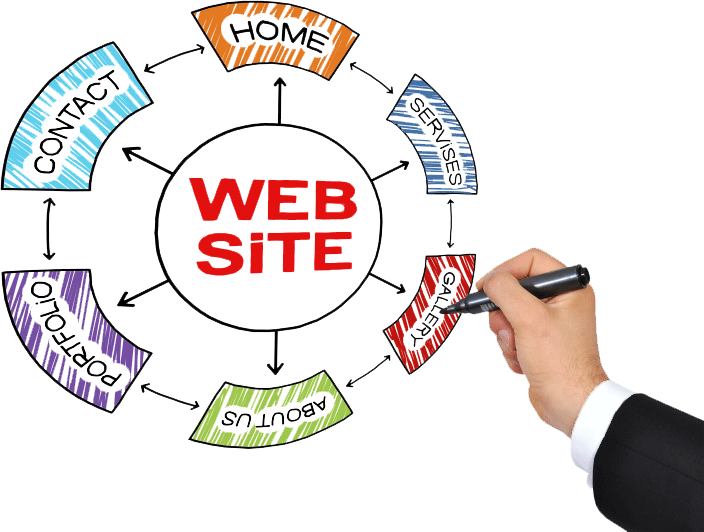
1. Landing Page: The first page visitors see when they visit your website.

Landing Page ExampleThis page should contain a brief welcome, a succinct summary of who you are (1-3 sentences), an overview of the information and resources your website contains (i.e. list pages you want visitors to checkout such as your about page, blog, book page, and public speaking page), and a way for visitors to contact you, preferably link(s) to your e-mail address or primary social media account(s).

Landing Page Examples: Liana M. Silva, Keith Harris, Kenneth Owen.


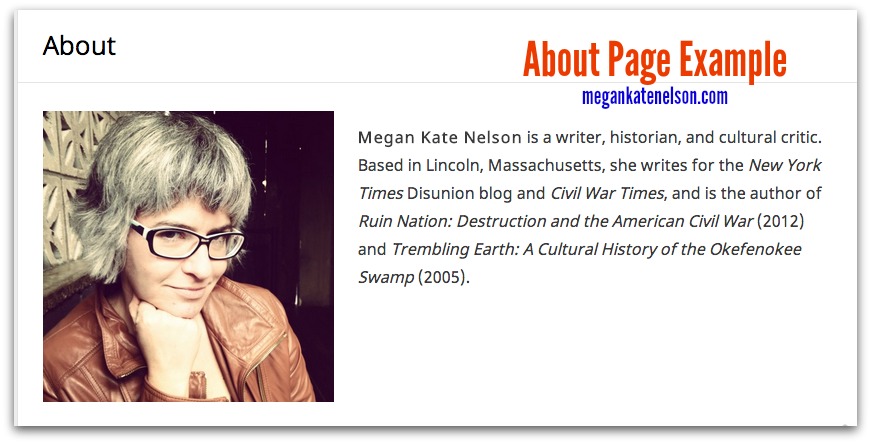
2. About Page: The page that explains who you are.

The best about pages get to the point and do not stretch accomplishments.

They contain a professional headshot and contact links.

About Page ExampleSome experts recommend that you write no more than two, short paragraphs on your about page; studies reveal that people have an attention span of about 8 seconds!

You can write as many paragraphs as you like, but be as succinct as possible. Keep large chunks of text to a minimum and make the information easy for visitors to skim by adding bold section titles.

You can also add photos or embed your CV at the bottom of your page.

I opted to create a separate page for my CV. About Page ExamplesMegan Kate NelsonJarret Ruminski, Kristen D. Burton


3. Research/Writing/Book Page(s): The page(s) where historians highlight their publications.

Books Page ExampleIf you have published a book, you should create a book page.

Book pages vary.

Some historians create a web page for each book.

Others offer a list of books with a photo of the cover and a brief synopsis of the book.

Book Page ExamplesChristopher Cameron and Ari Kelman


If you have not published a book, you should still create a publications or writing portfolio page.

You publication page should list your publications much like they appear on your CV, i.e. group your publications by type and introduce each type with a bolded section heading.

Some scholars also include a brief synopsis of their peer-reviewed journal articles.

When possible, include links to your publications. Publications Page Examples: Joe Adelman, Jana Remy, and Liz Covart (I offer my page because I couldn’t find another scholar who lists publications.)

Combined Publications Page Example


Some historians like to combine their books and articles into a single publications page.

Combined Publications Page Examples: Dan Cohen and Joyce E. Chaplin


4. Contact Page: The page that makes it easy for visitors to contact you.

Contact Page ExampleUse this page to provide links to your e-mail address and all social media accounts that you check regularly.

You could also include your mailing address, phone number, publisher, and literary agent.

Some historians also use a contact form.

Contact Page ExamplesAndrew Pegoda and Danielle McGuire


5 Optional Pages for Your Historian’s Website

1. Blog: blogs provide a fantastic medium to broadcast your ideas.

If you have a blog you should either keep the blog on your historian's website or provide a link from your historian's website to your blog.

If you have a blog, make sure you update it with some regularity.


OnlineHub2. Press/Media/News Page: This page lists information about your appearances in the press, public speaking engagements, or other positive news about you and your work.


3. Resources: Resource pages provide helpful information to your website's visitors. They also serve to draw visitors to your website.

The resources you offer could be as simple as a linked list of your favorite blogs, how-to resources, or useful articles.

Other ideas include social media hashtag lists specific to your subfield, links to your favorite online databases, or favorite books.


4. Teaching: If you teach history, consider creating a page that lists and describes the courses you teach or have taught.

Provide links to your syllabi whenever possible and consider offering a paragraph or two about your teaching philosophy.


Teaching Page Examples: Joseph M. Adelman offers 4 pages about his teaching: an overview, a blogging rubric, his work at Framingham State University, and the classes he taught at Johns Hopkins University.

John Fea has a page that links to his "Virtual Office Hours" YouTube videos.

Roy Rogers provides a page that lists the courses he has taught and links to individual webpages with information about each course.


5. Services: Do you provide a professional service such as writing, editing, research, or consulting?

Create a page that explains and offers your professional skills for hire.


Share StoryShare Your Story

What pages do you have on your historian’s website?

What questions do you have about how to create a website?


Why You Need a Platform & How to Build One

  1421697146_full.pngDo you have a platform?

A platform is a suite of tools that you can use to make you and your ideas, research, books, and projects visible to the world.

In this post you will discover why you need a platform and how you can build one.


Why You Need a Platform

Publishers want historians to have platforms because they want their authors to be able to sell books through who they are, who they know, and through social media.

However, an historian’s need for a platform extends further than their publisher’s desire to sell books.

Platforms allow historians to broadcast their ideas beyond their books and classrooms: They enable historians to publicize their ideas and research to the public.

The public needs to know, and in most cases wants to know, about history. A public that knows about the past can learn from successes and mistakes and act in a way that builds a better future.

Historians have the power to affect a better future by empowering the public with information about their history.

Promoting History, Not Propaganda

Glenn Beck and Bill O’Reilly wrote four of the thirteen best-selling history books in the United States in 2014.

Why did their books sell so well?

Aside from the fact that Beck and O'Reilly wrote them without jargon and without copious notes and citations (or any notes or citations), Beck and O’Reilly have platforms.

Historians may not have the platform that Fox News provides these propagandists, but we can put a dent in Beck and O’Reilly's “history” book sales by building platforms en masse.

The individual platforms of many historians will change what the history-loving public understands about history and how they discover and learn about their past.

Together we can make a difference in how the public appreciates and perceives history.

We may also be able to sell more history books.


How to Build a Platform

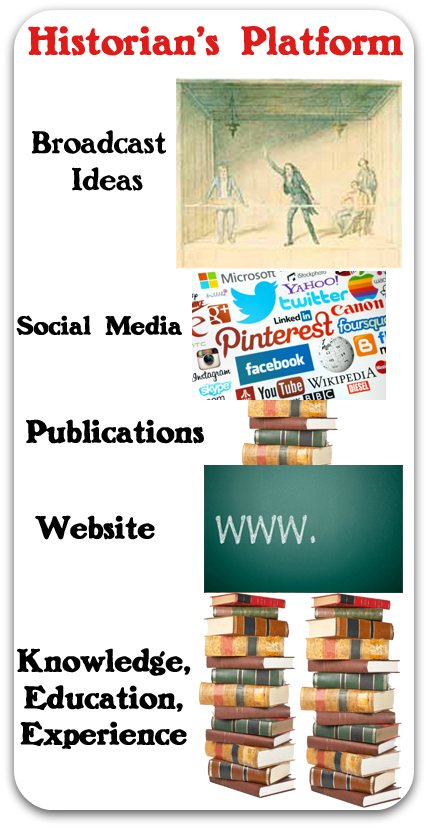
Platforms consist of several building blocks, or planks, that you can stand on to be heard and seen as a subject-matter expert or authority.


7 Platform Building Blocks

Historians-Platform1. Website: A website should be the first element you build when you create your platform.

Your website will serve as the primary place where people go to find more information about you and your work.


2. Publications: Published writing highlights your professional knowledge and establishes you as an expert in your field.

Publications also have the ability to connect you with readers.

If you want to create a wide-audience for your work, publish in non-academic magazines, newspapers, and blogs in addition to academic publications.


3. Newsletters: Newsletters provide you with a direct link to your readers and followers.

They work in conjunction with your website to call attention to you and your work.

You will need to develop a mailing list of people you can send your newsletters to if you want to make use of this weekly or monthly platform tool. (This will be the topic of a future post.)


4. Public Speaking: Public speaking engagements such as book talks or lectures at your local library, museum, or historical society provide you with opportunities to present your research and ideas in person.

They also furnish opportunities for your audience to meet you and get to know you as a person.


2637715-15. Social Media: Social media offer powerful outreach and community-building tools you can use to connect with a worldwide audience.

The popularity of interacting and connecting with other people online has given rise to many different networks, therefore you have a choice in the way(s) you interact with others.

However, bear in mind that the information you post and the community of fans and followers you build on Facebook, Twitter, Google+, etc. ultimately belong to those platforms. Therefore, social media should always be used in conjunction with a personal website, e-mail list, or blog.


6. Education: Education can be an important tool for historians, although not as important as producing a strong body of well-researched and well-presented work.

If you went to graduate school and have a masters or doctorate in history, mention this fact on your website about page and in the byline for your published work.


7. Volunteer Work: People love people who give back to their communities.

If you have helped a local historical society put together an exhibit, led the quest to save a local historic site, or have participated in some other community-minded organization let people know about it.

You can highlight Uncle_Samthese humanizing activities in your social media profiles, website about page, or bylines.

Additionally, volunteer work will help you network with people the old-fashioned way: by placing you in direct contact with other like-minded people. Your fellow volunteers may become your friends and biggest supporters when it comes time to spread the message about the history you study and write about.

Although volunteer work can serve as a powerful tool in your platform, you should only undertake it if you have a passion for a cause and want to better your community.


Conclusions

social media - internet networking conceptA platform comprises a suite of tools you can use to make your ideas, research, books, and projects visible to the world.

This post has outlined seven different elements that you could use to build your platform.

You do not have to adopt and cultivate all seven elements, but you should build a professional website.

As you consider which of the above planks you want to use to build your platform, think about how each element will help you showcase your authority and whether they will give people a good reason to follow you and your work.

Choose elements that will help you highlight your genuine character and humanity. People like to follow and support genuine and helpful individuals.

We have just scratched the surface of platforms.

Over the course of 2015 (and maybe 2016), we will explore all of these platform elements in greater detail because we need to build better platforms if we want to convey our historical knowledge to the large public of history-lovers.

Please let me know if you want to know more about a specific platform element. I will try to write and schedule requested posts sooner rather than later. E-mail Twitter | Facebook  

Resources

BooksHere are three books about building professional platforms that I recommend:

Chuck Sambuchino, [simpleazon-link asin="B00FGVWODY" locale="us"]Create Your Writer Platform: The Key to Building an Audience, Selling More Books, and Finding Success as an Author[/simpleazon-link]

Michael Hyatt, [simpleazon-link asin="159555503X" locale="us"]Platform: Get Noticed in a Noisy World[/simpleazon-link]

Seth Godin, [simpleazon-link asin="1591842336" locale="us"]Tribes: We Need You to Lead Us[/simpleazon-link]